
Vi har lanceret et kraftfuldt sæt funktioner, der er designet til at give administratorer mere fleksibilitet i, hvordan de administrerer skatter, rapporter og synlighed af begivenheder. Fra fleksible rapportdatoer til understøttelse af flere skatter på tværs af alle salgbare produkter og nye kontroller til synlighed af fællesskabsbegivenheder giver disse opdateringer dig mere kontrol.
Her er hvad der er nyt:
- Anvend skatter på pladsbookinger — Konfigurer og anvend flere skatter på rum, ressourcer, tjenester og gebyrer.
- Anvend mere end én afgift på billetter — Tildel flere skatter til den samme eventbillet.
- Styr offentlig synlighed af indsendte begivenheder — Skjul automatisk godkendte, indsendte begivenheder og lokalebookingsanmodninger fra din offentlige kalender.
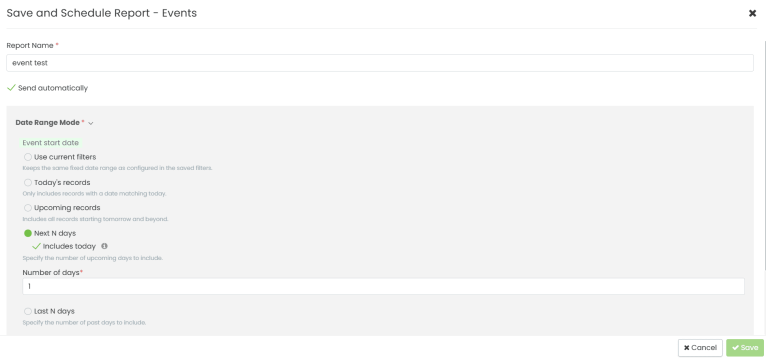
- Nye datointervalmuligheder for planlagte rapporter — Flere datointervalfiltre til rapporteksport.
1. Anvend skatter på pladsbookinger og relaterede varer
Nu kan du konfigurere og anvende skatter på rum, ressourcer, tjenester og gebyrer. Du kan også inkludere flere skatter på den samme vare. Som et resultat beregner systemet automatisk skatter ved kassen og viser dem som individuelle linjeposter, så slutbrugerne altid ser en klar oversigt over, hvad de betaler.
Derudover kan du oprette skatter én gang på arbejdsområde- eller kalenderniveau og genbruge dem på tværs af ethvert produkt eller enhver tjeneste.
Sådan konfigurerer du skatter:
- Gå til Indstillinger > Skatteindstillinger og opret dine skatter.
- Åbn en hvilken som helst konfiguration for rum, ressourcer eller tjenester og gebyrer.
- Vælg en eller flere skatter, der skal anvendes på den pågældende vare.
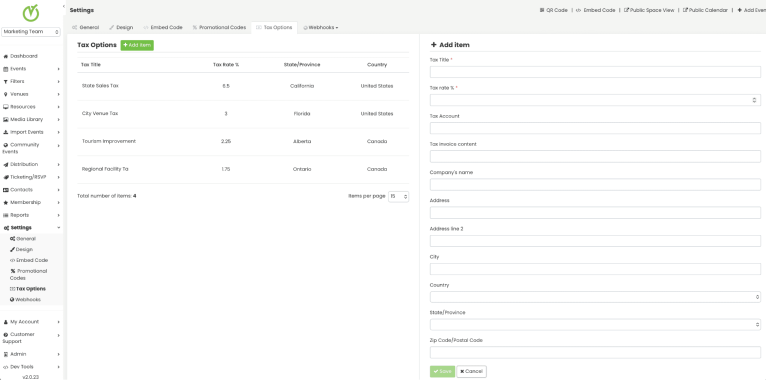
Derudover gemmer systemet skatteoplysninger for hver ordre og inkluderer dem i rapporter, hvilket sikrer præcis sporing og nem afstemning.
2. Anvend mere end én skat på billetter til arrangementer
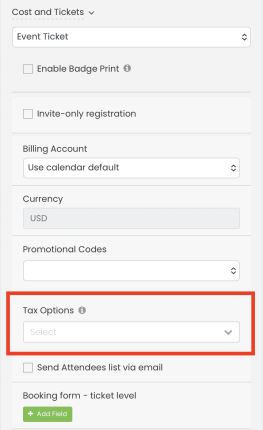
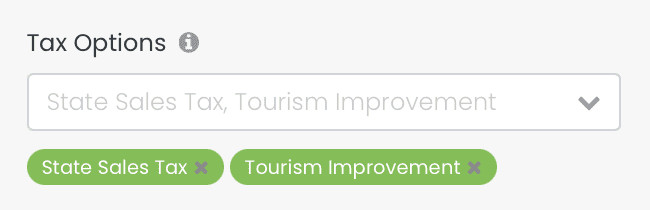
Billetter til events understøtter nu flere afgifter, der pålægges den samme vare. Systemet viser hver afgift som en separat linjepost ved kassen og gemmer den sammen med ordren til rapportering.
Sådan anvender du flere afgifter på en billet:
- Åbn en begivenhed og gå til Billetter konfiguration.
- Brug skattevælgeren til at vælge en eller flere skatter.
3. Fællesskabsbegivenheder: Kontroller synligheden af indsendte begivenheder
En ny indstilling giver dig mulighed for at bestemme, om godkendte, indsendte begivenheder og lokalebookingsanmodninger automatisk vises i din offentlige begivenhedskalender. Dette er nyttigt for organisationer, der ønsker at administrere offentlig synlighed manuelt efter godkendelse.
Sådan konfigurerer du denne indstilling:
- Gå til Dashboard > Fællesskabsbegivenheder > Indstillinger > Godkendelse af begivenhed.
- Skift Skjul indsendte begivenheder fra den offentlige kalender tændt eller slukket.
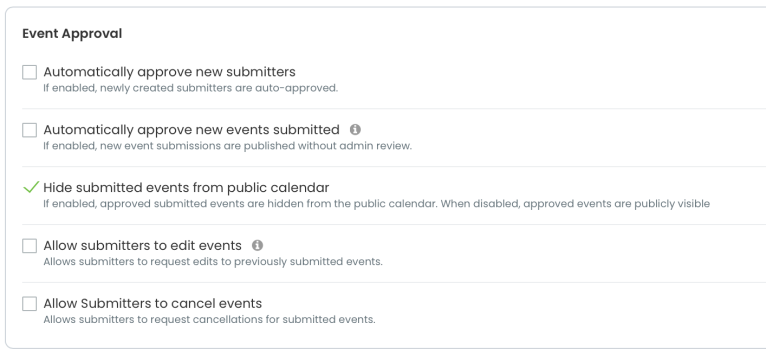
Når de er aktiveret, skjules godkendte begivenheder og lokalebookinger fra den offentlige kalender. Desuden vises de offentligt som før, når de er deaktiveret (standard).
4. Rapporter: Forbedrede datointervalindstillinger for planlagte rapporter
Datointervalfiltrene i eksporten af begivenhedsrapporter er blevet opdateret for at være mere fleksible. Du kan nu inkludere eller ekskludere den aktuelle dato fra både tidligere og fremtidige datointervaller, hvilket giver dig mere præcis kontrol, når du planlægger tilbagevendende rapporter.
Produktopdatering: Maj 2026
Denne måneds udgivelse hjælper dig med at køre mere problemfrit med mindre manuel indgriben. Uanset om det er gennem udvidede rapporteringsmuligheder, ved at anvende flere skatter automatisk ved kassen eller ved at kontrollere præcis, hvad der vises i din offentlige kalender.
For yderligere information om disse funktioner og for at bekræfte, om du har adgang til dem, bedes du kontakt osFind også nyttige guider og videovejledninger i vores Help Center.
Indholdsfortegnelse