At Timely, we are constantly improving our event management software solutions. In this post, you will learn about our product update posted on February 4, 2022, which includes a new SAML Single-Sign on integration, and improvements on the media library, Tickets / RSVP templates, design settings for carousel and more.
1. New SAML Single-Sign on Integration
Customers can now use their own identity providers to access their Timely account.
This new feature requires some configuration on both sides (Timely and customer), but it can be done through a specific request to our team. If you are interested on having this feature, please contact us.

2. Media Library Improvements
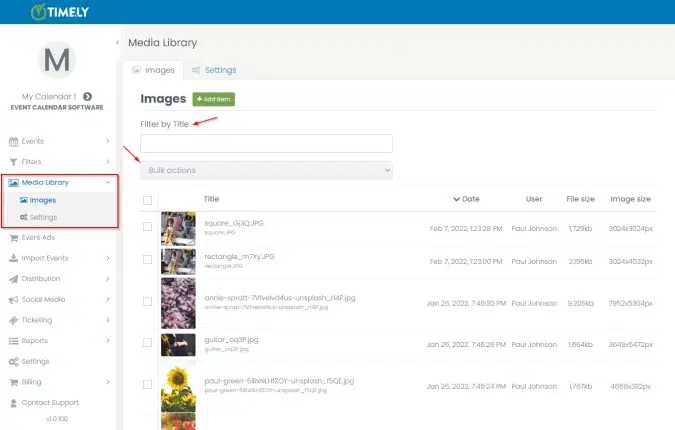
One of our greatest improvement requests in the Media Library is finally here! Now, you can search for images in the Media Library. In addition, we created a new dedicated menu item just for the Media Library on your main menu. The goal is to make our clients' lives easier when creating and managing events with our solution.
Search in Media Library
When you use the search function, the system looks for filenames and image alternative text.

Media Library Menu
We created a new menu item to show all images of the calendar. Since we are just now keeping track of the person who uploaded, for old images the user that uploaded will show up as the administrator.

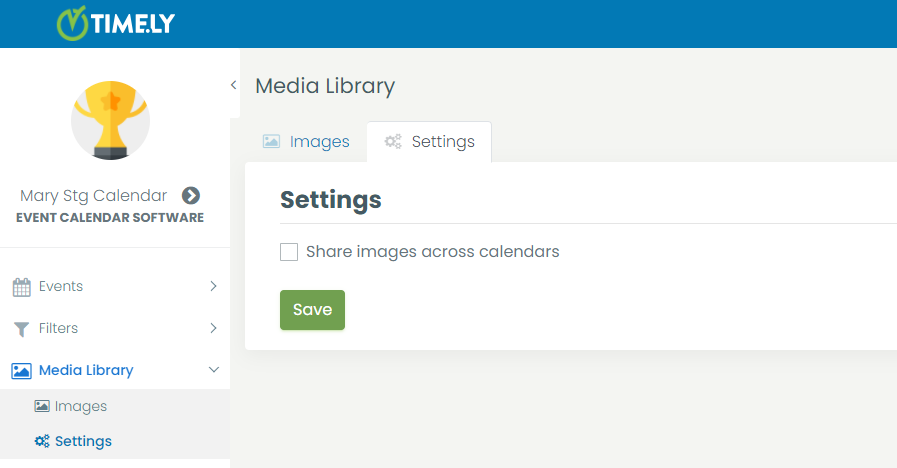
We've also included the ability to share images between calendars on the same account. This feature is turned off by default. If you want to share your images across calendars, go to Media Library<Settings and turn on the Share images across calendars option.
3. New dynamic fields for Tickets/RSVP template
We added a new dynamic field for the Tickets / RSVP template. Now, it is possible to use start time and end time to the template.

4. Design settings for Carousel
To complete the Carousel feature that was released last month, color customization options are now available in Design settings.

5. Purchase Ticket Add On
Customers who have Free and Basic Calendars can now buy the Ticket Add-On directly from their Timely dashboards, making it easier for them to sell tickets online.
If you think you can benefit from our last product update and would like to have these new features added to your plan, please contact us. We will be happy to help you.
For more user guidance, please go to our Help Center. If you have any questions or need additional assistance, do not hesitate to contact us. Alternatively, you can open a support ticket from your Timely account’s dashboard.
Table of Contents